How to arrange the styles. One home for every document.
You liked the 2×2. You asked how it should hold every kind of document Pertama makes: proposals, whitepapers, technical papers, pitch decks, training decks, the documents that support them, workbooks and handouts. This page compares three ways to arrange them and recommends one. Nothing here is decided. Section 8 lists the questions that need your call.
Section 1
The short answer
- Keep the 2×2. It picks the style: how the page sounds and looks.
- Add one short second list, the format: Deck, Paper, One-pager, Workbook. It says what the thing physically is.
- Every document is then two words. "Marketing deck". "Working paper". "Teaching workbook". A writer, human or AI, picks a style and a format and is done.
- Give teaching its own corner of the 2×2. Training material explains, but it has to hold a room. That is the top-right corner, where Editorial sits today with nothing drawn. This one is your call (question 1).
- Design things that are used together as a matched set. A training deck, its workbook, its handout and its facilitator guide share one style and one numbering.
The set stays small: two looks, four styles, four formats. No document type needs a look of its own.
Section 2
The 2×2, kept
The same two questions as page 1. What is the page trying to do: win the reader over, or explain? And how much does it dress up: expressive, or plain?
One thing became clear when we placed every document. The two rows are the two looks you already have. The top row is the current look. The bottom row is the new plain look. So the grid is not four looks. It is two looks, each used for two jobs.
2.1 As it stands on page 1
Win over
Explain
Expressive
MarketingPersuades a buyer who is not technical.
EditorialCarries a point of view to senior readers. Not drawn yet.
Plain
WorkingGets a decision made, or runs the work.
InformativeExplains and gives the evidence.
The problem: training has no clear home here. Page 1 split it between Working and Informative.
2.2 The one change we recommend (question 1)
Win over
Explain
ExpressiveThe current look
MarketingPersuades a buyer who is not technical.Editorial lives here as a quiet mode, for keynotes and essays.
TeachingHelps a room of people learn and practise. Engaging, because they are not specialists.
PlainThe new plain look
WorkingGets a decision made, or runs the work.
InformativeExplains and gives the evidence.
The gold dashed corner is the only change. "Teaching" is a working name. The name is yours (question 6).
2.3 Why teaching fits that corner
- It explains, and it must engage
- A training room is full of people who are not specialists. That is the same reason you kept the original whitepaper template: "more engaging for non-technical people".
- It already uses the top-row look
- Workbooks and training decks exist today in the current look: serif titles, cards, corner weave. Nothing needs converting.
- It is a core product
- Training is something Pertama delivers every week. It should not be a footnote inside two other styles.
- Editorial is the weakest fit there
- Page 1 already said so. Editorial wants to move the reader, so it leans left, toward Marketing. Only two Editorial page kinds exist, and both are borrowed from other styles.
2.4 The fair case for leaving Editorial where you put it
- It is your name
- You named four styles. This change turns one of them into a mode. That is why it is a question and not a decision.
- An advisory firm needs a voice
- Keynotes, essays and an annual letter are how a firm shows what it thinks. As a mode of Marketing, Editorial may get less care than it would as a full style.
- Nothing is lost either way
- No Editorial template exists yet, so nothing is retired. If a real keynote or letter needs more, Editorial can be drawn as a full style later.
Section 3
The grid: style and format
Read it like an address. Pick a column for the style. Pick a row for the format. The cell is the home. Each cell lists the documents that live there. Every document on this page sits in exactly one cell.
- Deck
- Slides shown on a screen. Wide-screen, 960 by 540.
- Paper
- An A4 document of several pages, read through.
- One-pager
- One or two A4 pages. Read in a minute, handed over or left behind.
- Workbook
- A4 pages that people write on.
| MarketingWin over · expressive The current look |
TeachingExplain · expressive The current look, plus teaching parts Depends on question 1 |
WorkingWin over · plain The new plain look |
InformativeExplain · plain The new plain look |
|
|---|---|---|---|---|
| DeckSlides on a screen | Marketing deckExists today
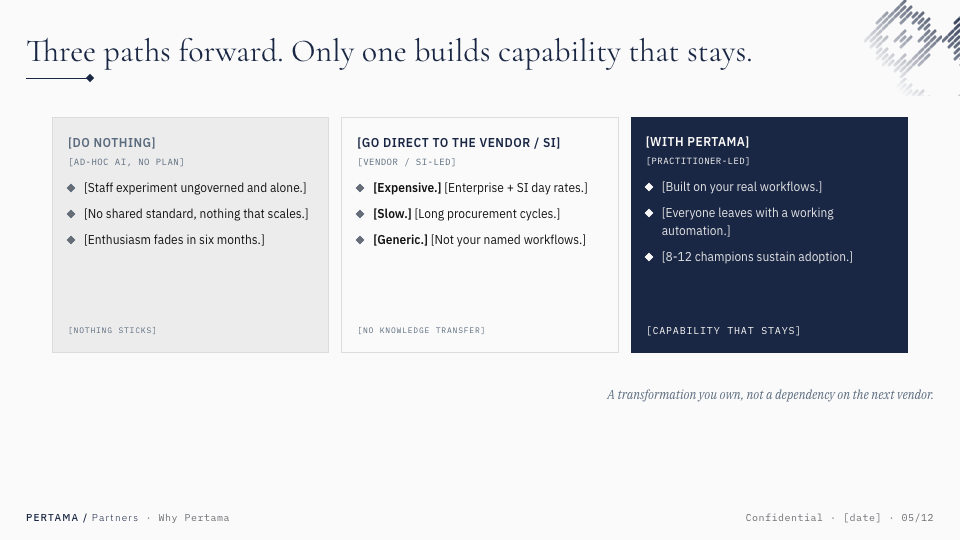 |
Teaching deckExists, not shown
A full training deck exists in the current look. No sample image is cleared for this page. |
Working deckExists today
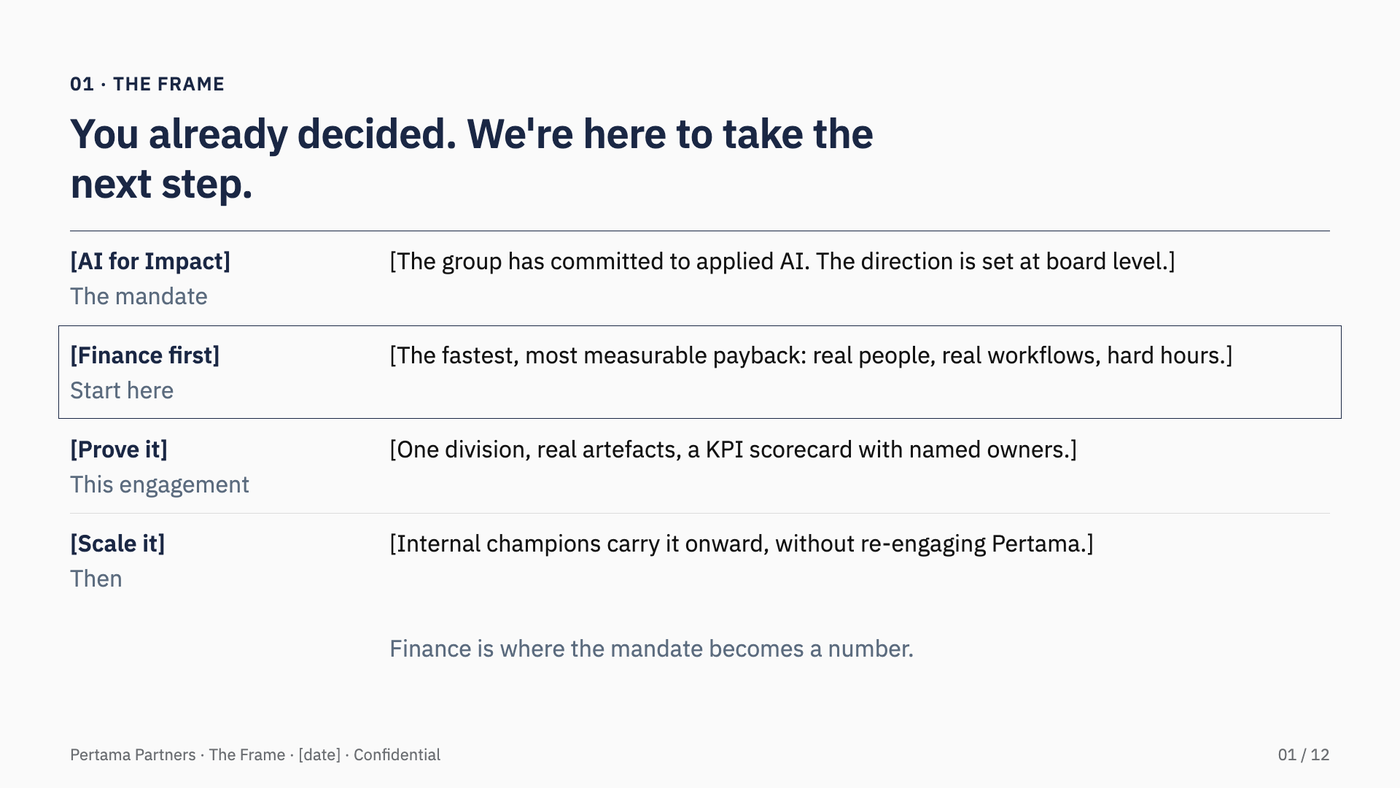 |
Informative deckDraw when needed
Rare. No one has asked for one yet. |
| PaperSeveral A4 pages, read through | Marketing paperExists today
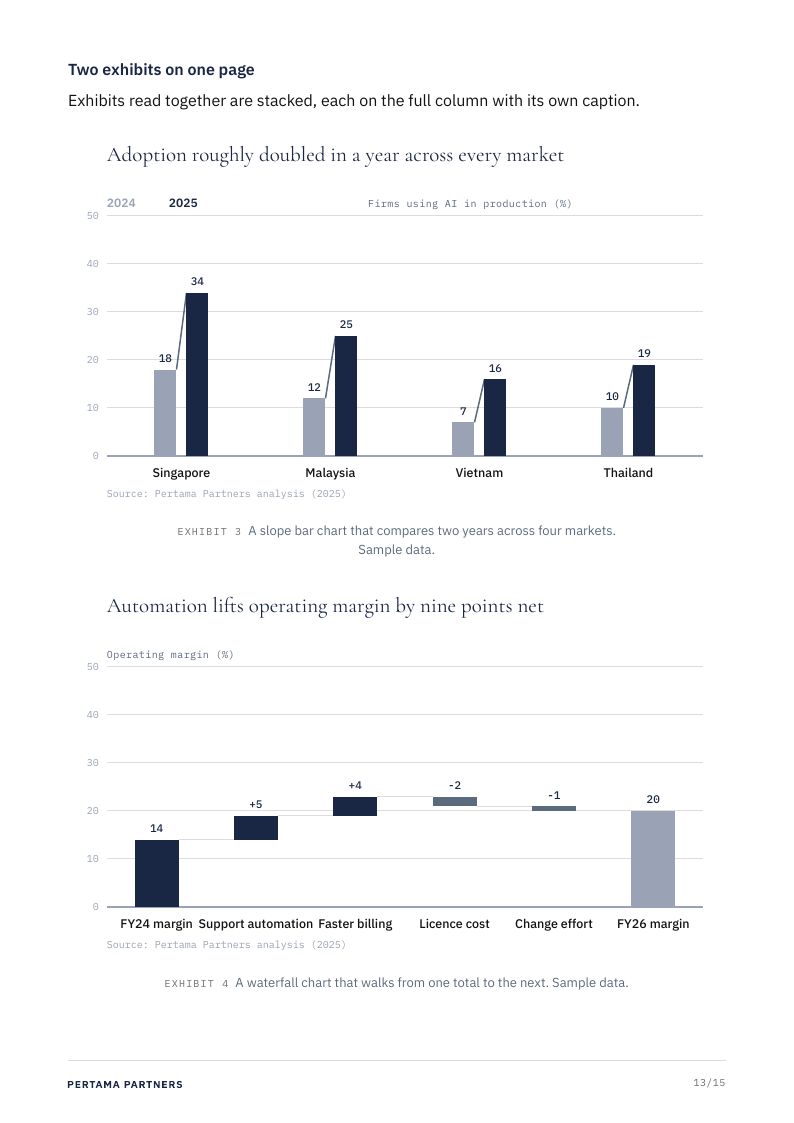 |
Teaching paperPartly exists
A facilitator guide recipe exists, with parts still flagged. Participant notes are not drawn. |
Working paperExists today
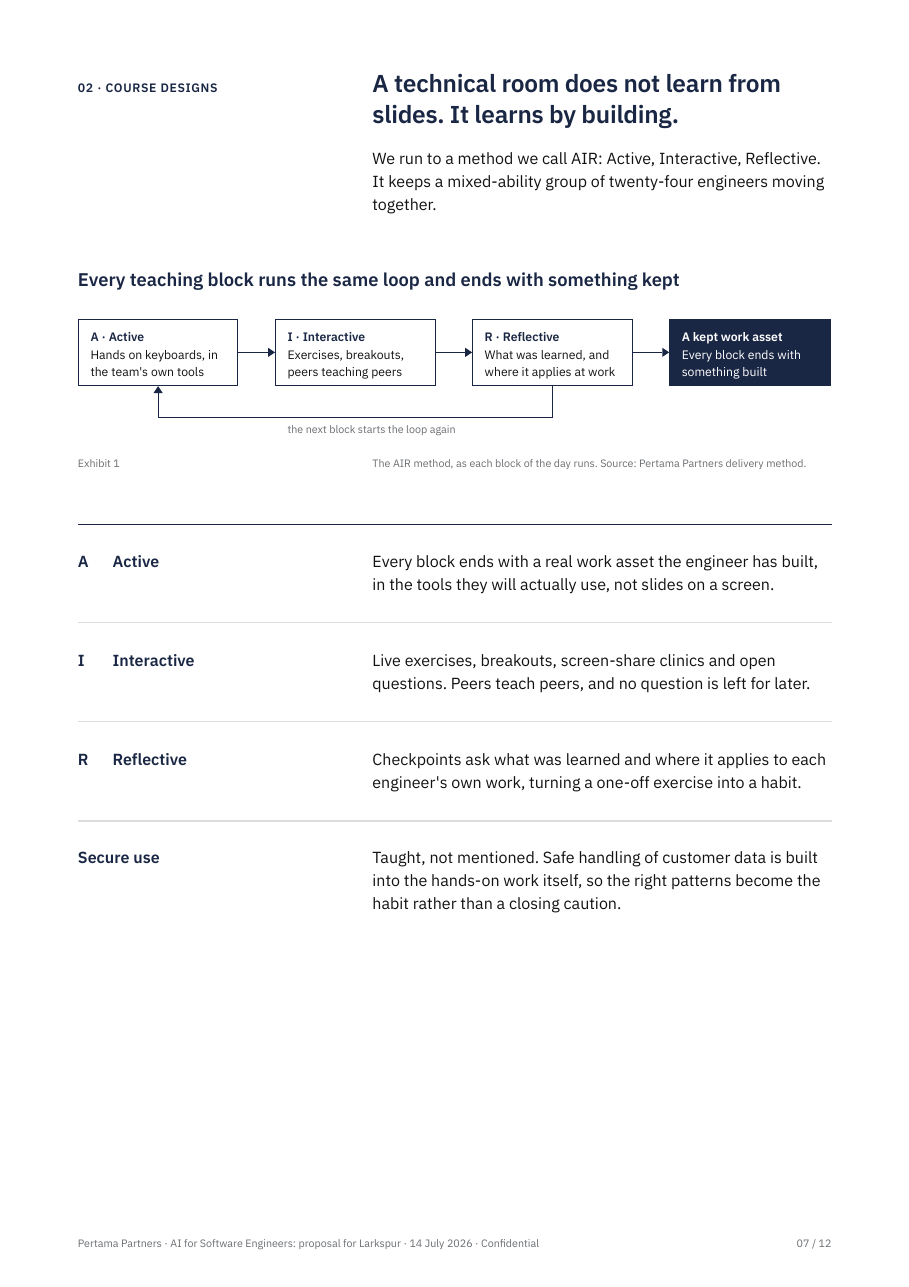 |
Informative paperExists today
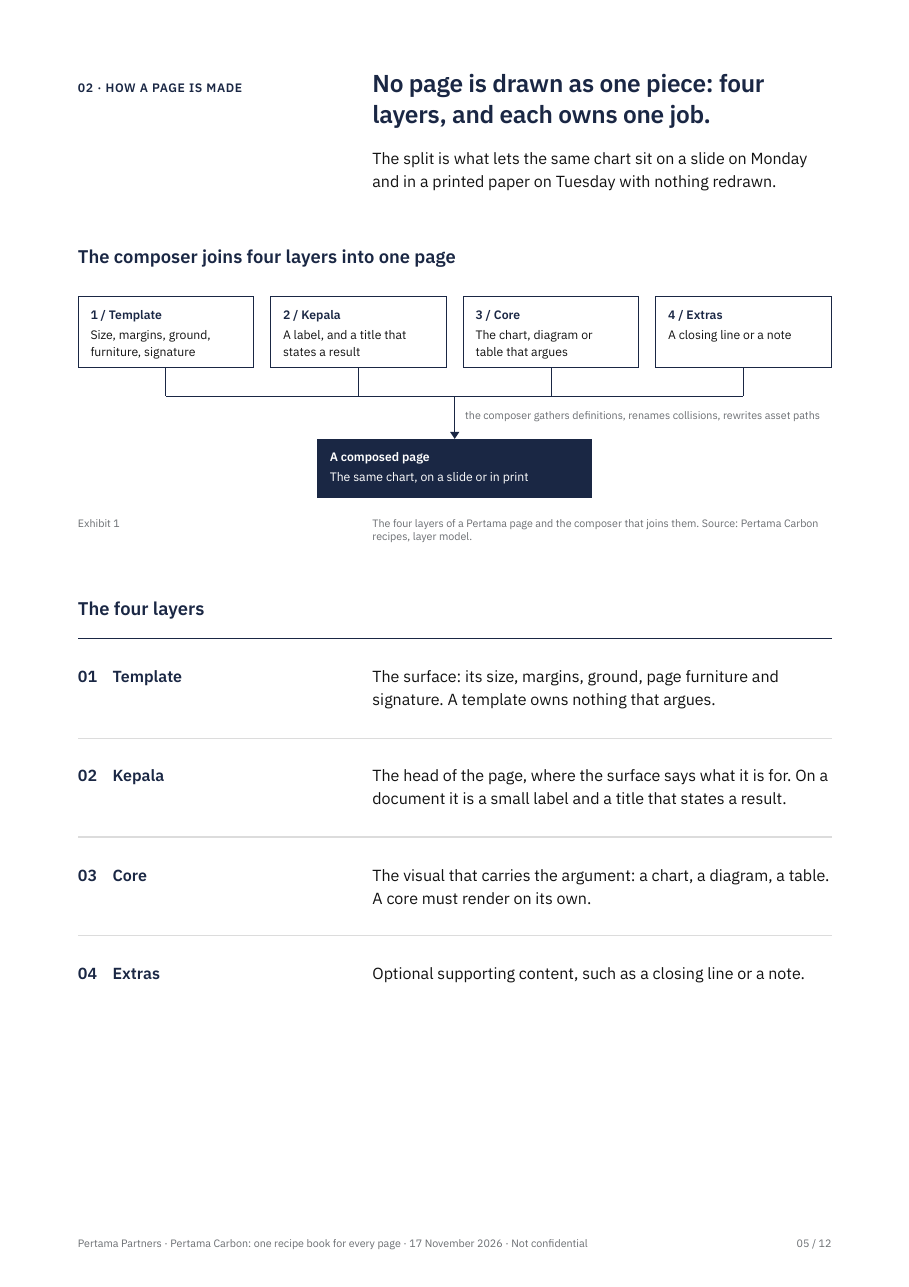 |
| One-pagerOne or two pages, handed over | Marketing one-pagerPartly exists
Named in the design system. No sample page yet. |
Teaching one-pagerTo draw
Small parts exist (tear-out card, daily schedule). The page itself is not drawn. |
Working one-pagerTo draw
|
Informative one-pagerDraw when needed
Rare. |
| WorkbookPages people write on | Closed You do not ask a buyer to do exercises. |
Teaching workbookExists today
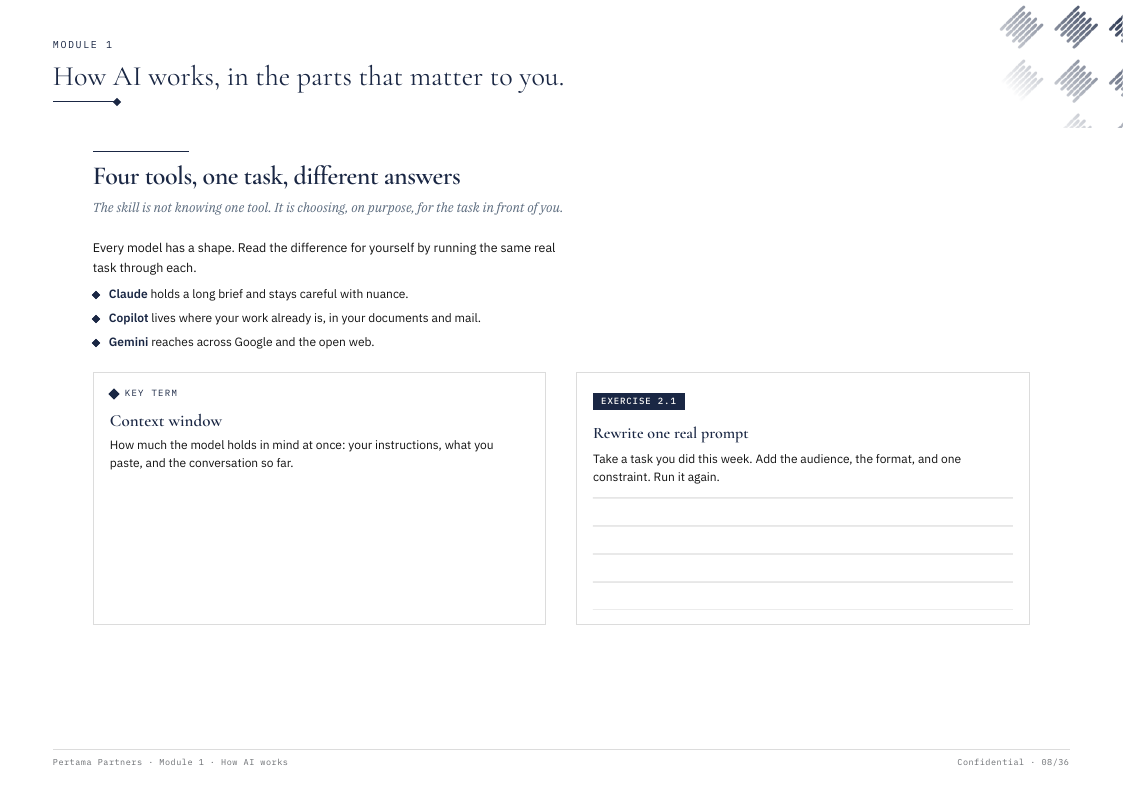 |
Closed Empty today. A client worksheet would go to Teaching. |
Closed Reference material is read, not written in. |
Sixteen cells. Thirteen are open and three are closed. Of the open ones, seven exist today (six are shown here), two partly exist, and four are still to draw. We would draw a cell only when a real document needs it.
If you answer 1b, Editorial becomes a fifth column and takes the keynote, the essay and the annual letter. If you answer 1c, the Teaching column goes away: its deck, workbook and one-pager move under Working, and its paper moves under Informative.
3.1 Why two words work
- The style word
- Sets the voice and the look: titles, cards or rows, how much weave, how full the page is.
- The format word
- Sets the physical thing: page size, cover, and the special parts. A workbook has writing lines. A deck has a big-number slide. A one-pager has no contents page.
- The everyday name
- People keep saying "proposal" or "handout". The finder in section 4 turns that name into its two words. A proposal is a Working paper. A handout is a Teaching one-pager.
- A new document type
- It gets a row in the finder, not a new style. The set of looks does not grow.
Section 4
Finder: every document
Forty-three rows of things Pertama makes, each with its two words. The first twenty-two are the ones you and page 1 named. The rest we found in the design system. Tell us the row number of any you disagree with.
| # | What you are making | Style | Format | Set | Why |
|---|---|---|---|---|---|
| 4.1 | Proposal | Working | Paper | Engagement | The client is choosing. Options, price and next step, plainly. |
| 4.2 | Statement of work | Working | Paper | Engagement | Checked line by line. Nothing should distract. |
| 4.3 | RFP response | Working | Paper | Scored against set questions. Answers must be easy to find. | |
| 4.4 | Sales or pitch deck | Marketing | Deck | Pitch | The buyer is deciding whether to care. |
| 4.5 | Capability statement | Marketing | One-pager | Pitch | Read by people who do not know Pertama yet. |
| 4.6 | One-pager | Marketing | One-pager | Pitch | One idea, skimmed in seconds. |
| 4.7 | Marketing whitepaper | Marketing | Paper | Your ruling: the original template. | |
| 4.8 | Case study | Marketing | Paper | A story with one big result, made to be passed around. | |
| 4.9 | Technical whitepaper | Informative | Paper | The reader is a specialist and wants the evidence. | |
| 4.10 | Technical paper | Informative | Paper | Same reader, more detail. | |
| 4.11 | Research paper | Informative | Paper | Your ruling: the new plain look for informative papers. | |
| 4.12 | Playbook or guide | Informative | Paper | A reference people return to. | |
| 4.13 | Steering-committee or status deck | Working | Deck | Engagement | Each slide asks for a decision or reports on one. |
| 4.14 | Client report | Working | Paper | Engagement | Records what was done and what to do next. |
| 4.15 | Board paper | Working | Paper | It ends in a decision. | |
| 4.16 | Training deck | Teaching | Deck | Training | Shown in the room while people learn. |
| 4.17 | Facilitator guide | Teaching | Paper | Training | The trainer's script. Follows the deck slide by slide. |
| 4.18 | Participant notes | Teaching | Paper | Training | The deck's content written out, to read afterwards. |
| 4.19 | Workbook | Teaching | Workbook | Training | People write in it during the session. |
| 4.20 | Handout | Teaching | One-pager | Training | One page a participant keeps. |
| 4.21 | Keynote | Marketing | Deck | Editorial mode. The speaker carries the detail. | |
| 4.22 | Essay, opinion piece or annual letter | Marketing | Paper | Editorial mode. A point of view with little data. | |
| 4.23 | Capability deck | Marketing | Deck | Pitch | Introduces the firm. |
| 4.24 | Event or conference deck | Marketing | Deck | Has to hold a hall. | |
| 4.25 | Executive briefing | Marketing | Paper | A short read for a senior buyer. One idea a page. | |
| 4.26 | Training catalogue | Marketing | Paper | It sells the courses. | |
| 4.27 | Brochure | Marketing | Paper | It sells. | |
| 4.28 | Tearsheet | Marketing | One-pager | Pitch | One service on one page, left behind. |
| 4.29 | Event invite | Marketing | One-pager | Has to be noticed. | |
| 4.30 | Masterclass deck | Teaching | Deck | Training | A training deck for senior people. |
| 4.31 | Job aid or cheat sheet | Teaching | One-pager | Training | Kept on the desk after the course. |
| 4.32 | Session agenda | Teaching | One-pager | Training | The day on one page. |
| 4.33 | Completion certificate | Teaching | One-pager | Training | One page per participant. Not drawn yet. |
| 4.34 | Decision workshop deck | Working | Deck | Engagement | The room decides, it does not learn a skill. |
| 4.35 | Proposal walk-through deck | Working | Deck | Engagement | The proposal, presented. |
| 4.36 | Scoping brief | Working | Paper | Engagement | Sets out the work before the priced proposal. |
| 4.37 | Findings memo or discovery recap memo | Working | Paper | Engagement | Short, and ends in next steps. |
| 4.38 | Partnership discussion paper | Working | Paper | Peer to peer. Asks for a conversation. | |
| 4.39 | Status report or decision note | Working | One-pager | Engagement | Regular, short, read for what changed. |
| 4.40 | Industry investigation report | Informative | Paper | A deep study with many figures. | |
| 4.41 | Reference document or compendium | Informative | Paper | Long, and read in parts. | |
| 4.42 | Briefing deck read at a desk | Informative | Deck | Rare. Slides that are read, not presented. | |
| 4.43 | Fact sheet | Informative | One-pager | Rare. The facts on one page, no pitch. |
4.44 The hard ones, and the test we used
- Workshop deck
- Ask: does the room learn a skill, or make a decision? Learn is Teaching. Decide is Working. Page 1 had all workshop decks under Working.
- Proposal
- It sells, but it is checked line by line and ends in a signature. So Working, not Marketing. The pitch deck that comes before it is Marketing.
- Case study
- Marketing by default. One with heavy data, written for specialists, is an Informative paper.
- Executive briefing
- Marketing when it goes to a buyer. If it reports on work already under way, it is a Working paper.
- Board paper
- Working when it ends in a decision. If it is only for noting, Informative.
- Playbook or guide
- Informative when it is a reference. If it is given out in a course with exercises, it is a Teaching workbook.
- What changed from page 1
- Three rows move. Workbook (8.18) and training material (8.21) move to Teaching. Workshop deck (8.14) splits in two by the test above.
Section 5
Matched sets
Some documents are never used alone. A trainer shows a deck while each person has a workbook open, and the trainer follows a guide. If those three look unrelated, or number their sections differently, the room gets lost. So we recommend designing them as a set.
- 5.1 One style per set
- Every piece in a set uses the same style. The formats differ, the style does not.
- 5.2 One cover family
- The same title, the same cover design, sized for each format.
- 5.3 One numbering
- Module 3 in the deck is module 3 in the workbook, the guide and the handout. A trainer can say "turn to 3.2" and everyone finds it.
- 5.4 Same pictures
- A diagram on a slide is the same diagram in the workbook, not a redrawn cousin.
Training set
Teaching · build this one first
- Training deck
- Workbook
- Facilitator guide
- Participant notes
- Handout or job aid
- Certificate, later
The deck and the workbook exist. The guide partly exists. The handout and the notes are to draw.
Pitch set
Marketing · later
- Pitch or capability deck
- One-pager or tearsheet
- Capability statement
What a buyer sees in the meeting and what is left on the table afterwards.
Engagement set
Working · later
- Proposal and statement of work
- Steering deck
- Status report
- Client report
One client, one project, from signing to close. The same project name and section numbers throughout.
Two documents in different styles can still travel together. A research paper may have a Marketing one-pager that sums it up. That is two documents, not a set.
Section 6
Two other ways, and why not
We compared three arrangements. The grid in section 3 is the one we recommend. These are the other two.
6.1 Style only: the 2×2 with a list in each corner
| Win over | Explain | |
|---|---|---|
| Expressive | Marketing pitch deck, whitepaper, one-pager, case study, capability statement, invite, brochure… | Editorial keynote, essay, annual letter |
| Plain | Working proposal, statement of work, RFP response, steering deck, status report, board paper, client report, workshop deck, workbook… | Informative research paper, technical paper, playbook, training reading… |
Good: one word, and it is what page 1 shows. Why not: the lists get long and Working turns into a drawer for everything. Training is split across two corners. And nothing says who owns the parts only a workbook or a deck has.
6.2 Job-led families: start from the reader's job
| Family | Owns |
|---|---|
| Sell | pitch deck, one-pager, marketing whitepaper, case study |
| Decide | proposal, statement of work, steering deck, board paper |
| Teach | training deck, workbook, handout, facilitator guide |
| Explain | research paper, technical paper, playbook |
| Argue | keynote, essay, annual letter |
Good: a writer thinks in jobs, and teaching gets a clear home. Why not: it drops the 2×2 and your four names. Five families invite five looks, and you have two. Many documents do two jobs: a proposal sells and decides. We kept its best idea: the Teach family became the Teaching corner and the Training set.
Section 7
What it costs
- 7.1 Two words, not one
- Writers learn a second short list. The finder does the lookup for them.
- 7.2 Editorial steps back
- If you take 1a, one of your four names becomes a mode of Marketing. It can come back as a full style when a real keynote or letter needs it.
- 7.3 Empty cells tempt people
- Four open cells have nothing drawn. The rule has to hold: draw a cell only when a real document needs it.
- 7.4 Some drawing for the Training set
- A handout page, participant notes, and a facilitator guide that matches the deck and the workbook.
- 7.5 Two looks in one client project
- A client may see a plain Working steering deck on Monday and an expressive Teaching deck on Tuesday. That is on purpose. Section 6 of page 1 lists what keeps them looking like one firm.
- 7.6 Page 1 needs a small update
- Its questions 1 and 3 are replaced by questions 1 and 3 below. Its other six questions still stand. Nothing existing is converted or retired by any answer marked rec here.
Section 8
Questions for you
Each has lettered options and one recommendation. You can answer in chat with the question number and a letter.
Where does teaching material live?
Training decks, workbooks, handouts and facilitator guides explain, and they must hold a room of non-specialists. That is the top-right corner of your 2×2. Editorial sits there today with nothing drawn (section 2).
- a Teaching takes the top-right corner. Editorial stays as a named quiet mode of Marketing, for keynotes and essays. → rec
- b Editorial keeps the corner as you named it. Teaching becomes a fifth style beside the grid.
- c Keep the four as they are. Training decks, workbooks and handouts go under Working. Training reading goes under Informative.
Do we name every document with two words, a style and a format?
For example "Marketing deck", "Working paper", "Teaching workbook" (section 3).
- a Yes. Four formats: Deck, Paper, One-pager, Workbook. → rec
- b Yes, but change the format list. Tell us what to add or rename.
- c No. Style only, as on page 1.
Which look does teaching material use?
Workbooks and training decks use the current look today.
- a The current look: serif titles, cards, corner weave, plus the teaching parts (exercises, writing lines, key terms). Nothing is converted. → rec
- b The new plain look: bold claim titles and rows. Workbooks would be re-set, and you see the list first.
- c A third look of its own. We bring options.
Do we design matched sets?
A set shares one style, one cover family and one numbering (section 5).
- a Yes. The Training set first. The Pitch set and the Engagement set later, when needed. → rec
- b Yes, all three now.
- c No sets. Each document stands alone.
What do we draw first?
Four open cells have nothing drawn, and two are only partly drawn (section 3).
- a The gaps in the Training set: a handout, participant notes, and a facilitator guide that matches the deck and workbook. → rec
- b A full Editorial sample: a cover, an essay page and a sample deck.
- c The plain one-pagers: a status report and a fact sheet.
- d Nothing yet.
Is "Teaching" the right name?
Only matters if you answer 1a or 1b. The other three names are yours and stay.
- a Teaching. → rec
- b Training.
- c Learning.
- d Another name. Tell us.
To take every recommendation, reply all rec. Or answer one by one, for example: 1a 2a 3a 4a 5a 6b.